

It’s so frustrating when you’re on the verge of using your phone and the battery drained. Over the time, our iPhone’s battery will degrade in which it won’t be able to hold as much of a charge. And this kind of frustration haunts us whenever we forgot to bring our power banks.
With the latest iPhone 7 and 7 Plus, they have bigger batteries than predecessors yet, they barely but still run into classic problem which is batteries degrade, making it a struggle for us to last through the day.
Even though iPhone 7 and iPhone 7 Plus have better batteries life due to the ultra-snappy and efficient quad-core A10 Fusion chip and with a larger batteries inside, there’s much you can do to further improve the battery life of your iPhone 7 or 7 Plus.
Update to the latest software.
Apple software updates often include advanced energy-saving technologies, so always make sure your device is using the latest version of iOS.
Avoid extreme ambient temperatures.
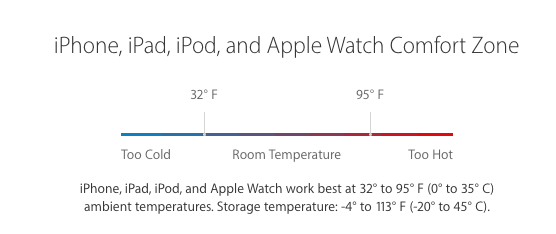
Your device is designed to perform well in a wide range of ambient temperatures, with 62° to 72° F (16° to 22° C) as the ideal comfort zone. If your device is exposed to ambient temperatures higher than 95° F (35° C), it can permanently damage battery capacity which means your battery won’t power your device as long on a given charge. Charging the device in high ambient temperatures can cause further damage. Even storing a battery in a hot environment can damage it irreversibly. When using your device in a very cold environment, you may notice a decrease in battery life, but this condition is temporary. Once the battery’s temperature returns to its normal operating range, its performance will return to normal as well.
Optimize your settings.
There are two simple ways you can preserve battery life — no matter how you use your device: adjust your screen brightness and use Wi-Fi.
Dim the screen or turn on Auto-Brightness to extend battery life by swiping up from the bottom of the screen to open Control Center and drag the Brightness slider to the left.
To adjust your screen to lighting conditions automatically, activate your Auto-Brightness.
Go to Settings > Display & Brightness and set Auto-Brightness to On.
When you use your device to access data, a Wi-Fi connection uses less power than a cellular network. So, swipe up to open Control Center, tap the Wi-Fi icon, and log in to a Wi-Fi network.

Enable Low Power Mode
With the latest version of iOS, Low Power Mode helps you to extend the battery life of your iPhone when it starts to get low. Your iPhone reminds you when your battery level goes down to 20%, and again at 10%, signaling you turn on Low Power Mode with one tap.
Or you can enable it by going to Settings > Battery. Low Power Mode reduces display brightness, optimizes device performance, and minimizes system animations. But you can still use key functions like making and receiving phone calls, email, and messages, accessing the Internet, and more.Low Power Mode automatically switches off when you charge your phone.

View Battery Usage information
You can now manage your device’s battery easily where you can see the proportion of your battery used by each app.
To view your usage, go to Settings > Battery.
Background Activity. This indicates that the battery was used by the app while it was in the background
To improve battery life, you can turn off the feature that allows apps to refresh in the background. Go to Settings > General > Background App Refresh and set the switch to Off.
